Tool: panel-map
This page is for builders wiring their own multi-panel sign who need a
pixel_mapper_config Remap string — the line that tells the library which panel
is first in the cable chain, where each one lands on the canvas, and how each is
rotated. Hand-deriving it is the usual pain: edit → photograph random scrolling
text → guess → repeat.
panel-map replaces that loop with a four-step workflow: reveal your layout
on the panels → transcribe the grid you see → derive the string →
verify it on the real canvas. It is implemented at
scripts/panel_map.py
and mirrors the conventions of panel-test.
Like panel-test, panel-map reads the [display] section of any led-ticker
config TOML and reuses the same LedFrame construction the main app uses — so
every panel knob (rows, cols, chain_length, panel_type, gpio_slowdown,
rp1_pio) is exactly what the running ticker would see. Widget config is ignored.
All commands below use the -docker targets — the supported path on a
deployed sign. They run inside the production image, so build it once first with
make build. (A dev host with the repo and uv installed can drop the
-docker suffix; see the subcommand reference.)
Bigsign worked example
Section titled “Bigsign worked example”The bigsign is a 2×4 vertical-serpentine layout: eight P3 32×64 panels, data chain entering at the bottom-right, climbing each column bottom-to-top, then jumping diagonally to the bottom of the next column to the left. Here is the end-to-end walkthrough.
Step 1 — reveal
Section titled “Step 1 — reveal”Stop the ticker and paint the calibration pattern:
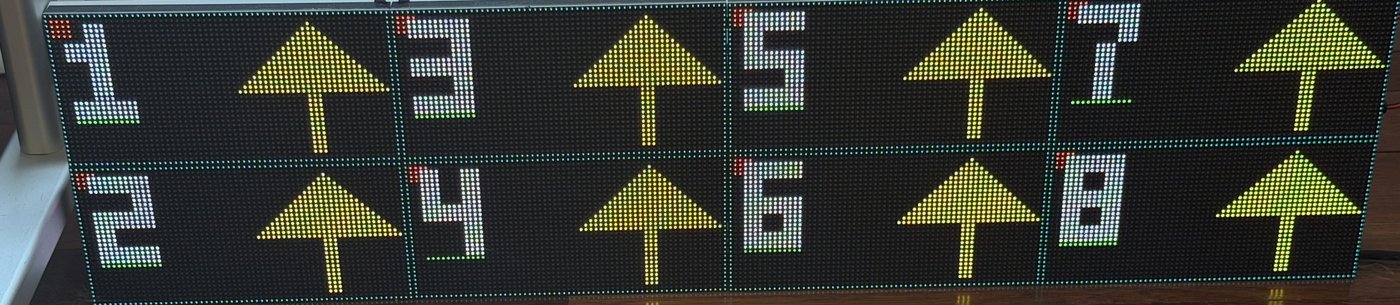
docker compose stopmake panel-map-reveal-docker CONFIG=config/config.bigsign.example.tomlEach physical panel lights up with a number, an up-arrow, a bright corner dot in
the logical top-left, a border around the slot, and an underline directly beneath
the digit so a rotated number (a sideways 6 or 9) is never ambiguous — you
read the digit relative to its underline, not relative to the room.
Step 2 — transcribe
Section titled “Step 2 — transcribe”Shoot the wall square-on (lights toward you, camera level). Write one
<number><flag> token per panel. Write the top wall row first, left to right,
exactly as the panels hang — transcribe the numbers as you see them, even when
they look out of order. Do not rotate the photo to make them count up. For the
bigsign (8 panels, all installed upright) the wall above reads:
1n 3n 5n 7n2n 4n 6n 8nThese numbers are reveal’s own labels, not your cable order — they run opposite
to it (here reveal paints 1 on the panel farthest down the chain and 8 on
the cable-entry panel). That’s fine, and it’s the whole point: you never have to
reason about your wiring. Transcribe what you see and derive untangles the
snake for you. Save it to a file:
cat > layout.txt <<'EOF'1n 3n 5n 7n2n 4n 6n 8nEOFOr just open layout.txt in any editor (nano layout.txt on the Pi) and type
the grid.
For a single-row chain (e.g. 5 panels side by side), the grid is one line:
1n 2n 3n 4n 5n.
The n flag means each panel is oriented normally (arrow up, dot top-left). See
the orientation legend below for rotated panels.
Step 3 — derive
Section titled “Step 3 — derive”make panel-map-derive-docker LAYOUT=layout.txt CONFIG=config/config.bigsign.example.tomlderive prints the Remap string to stdout:
Remap:256,64|192,32n|192,0n|128,32n|128,0n|64,32n|64,0n|0,32n|0,0nCopy that into your [display] block:
pixel_mapper_config = "Remap:256,64|192,32n|192,0n|128,32n|128,0n|64,32n|64,0n|0,32n|0,0n"This string matches config/config.bigsign.example.toml character-for-character.
A golden tripwire test keeps them in sync — if derive ever diverges, CI fails.
Step 4 — verify
Section titled “Step 4 — verify”Paste the string into your config (or supply it directly with --mapper) and
confirm the canvas is coherent:
make panel-map-verify-docker CONFIG=config/config.bigsign.example.toml# or supply the string directly:make panel-map-verify-docker MAPPER="Remap:256,64|192,32n|192,0n|128,32n|128,0n|64,32n|64,0n|0,32n|0,0n"docker compose startverify paints a panel-seam grid and, in every cell, a reading-order number
(1, 2, 3, 4 across the top, 5, 6, 7, 8 across the bottom — left to right, top to
bottom), an up-arrow, and a red dot in the top-left corner. A correct mapper
makes those numbers read in order across the whole wall, every arrow pointing up,
every dot top-left:
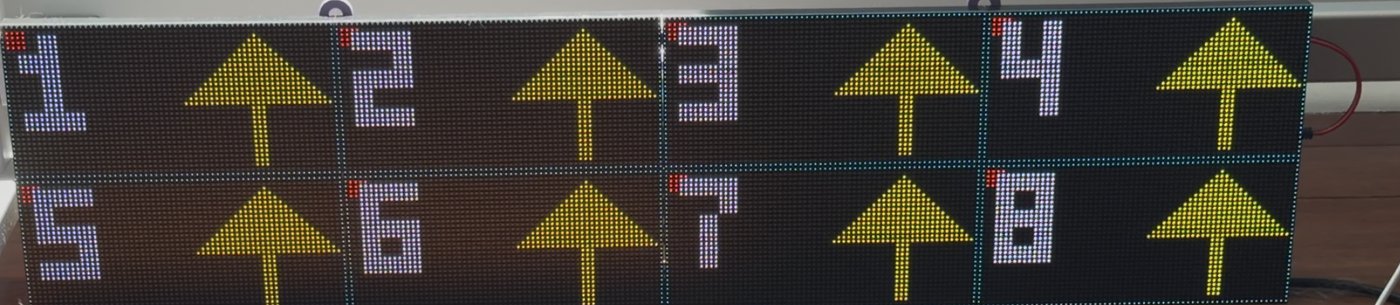
A wrong mapper scrambles those numbers (a panel lands out of sequence) or rotates an arrow (a panel’s orientation flag is off) — each panel diagnoses itself. See How to read verify below.
Subcommand reference
Section titled “Subcommand reference”reveal — chain and orientation calibration
Section titled “reveal — chain and orientation calibration”Runs with pixel_mapper_config forced to the identity mapping (no panel
rearrangement), so each panel shows the number of the raw frame-buffer slot that
physically lands on it. Those numbers are the tool’s own labels — you transcribe
them and derive converts. (They run opposite to cable order; you never need to
match them to your wiring.) Photograph the result and you have everything derive
needs.
docker compose stopmake panel-map-reveal-dockermake panel-map-reveal-docker CONFIG=config/config.mysign.toml HOLD=5docker compose startOn a dev host with the repo and uv installed (not a deployed sign), drop the
-docker suffix: make panel-map-reveal. The make targets wrap
python scripts/panel_map.py reveal --config $(CONFIG) --hold $(HOLD) — the same
CONFIG= / HOLD= override convention as make panel-test.
Per panel, reveal paints (all via SetPixel, never DrawText):
- The panel number as a large BDF digit, centered.
- An up-arrow — the primary rotation tell.
- A bright dot in the logical top-left corner — disambiguates 90° vs 270°.
- A 1 px border around the slot.
- A short underline directly beneath the digit.
Ctrl-C exits cleanly: a final black frame is swapped on so the panel never sticks on the calibration pattern.
| Flag | Type | Default | Meaning |
|---|---|---|---|
--config | path | config/config.toml | Config TOML to read [display] from. |
--hold | float | 2.0 | Seconds between swap ticks (extend for a steady hold). |
derive — string generator (no hardware needed)
Section titled “derive — string generator (no hardware needed)”Reads the transcribed grid from --layout FILE and prints the Remap: string
to stdout. Diagnostics (chain-count mismatch warnings, parse errors) go to
stderr. No hardware is needed — this step is pure computation.
make panel-map-derive-docker LAYOUT=layout.txtmake panel-map-derive-docker LAYOUT=layout.txt CONFIG=config/config.mysign.tomlThe -docker target pipes your layout.txt into the image’s stdin; on a dev
host with uv, make panel-map-derive LAYOUT=layout.txt runs it directly. The
CONFIG argument is read only for chain_length × parallel, as a correctness
check on the cell count in your grid — a mismatch warns on stderr but doesn’t
hard-fail.
| Flag | Type | Default | Meaning |
|---|---|---|---|
--config | path | config/config.toml | Config TOML — read for chain_length / parallel correctness check only. |
--layout | path | stdin | Layout file (recommended). One row per wall row, cells <number><flag>. |
Validation messages are plain-language — for example:
"You listed panel 1 twice. Each panel number must appear exactly once in your grid.""Row 2 has 3 panels but row 1 has 4. Every wall row needs the same number of cells.""'7z' isn't a valid cell. Each cell is a panel number followed by one of n, s, e, w, x (e.g. '3s')."
derive supports a single data chain (parallel = 1), which covers every
reference build. A multi-chain (parallel > 1) config is refused with a clear
message rather than emitting a silently-wrong string.
verify — coherent full-canvas diagnostic
Section titled “verify — coherent full-canvas diagnostic”Applies a candidate mapper and paints a self-diagnosing image across the whole finished canvas. A correct mapper produces a coherent, in-order image; a wrong one shows exactly which panel is off and how.
docker compose stopmake panel-map-verify-docker CONFIG=config/config.mysign.tomlmake panel-map-verify-docker MAPPER="Remap:256,64|..."docker compose startOn a dev host, drop the -docker suffix. The painted image is independent of
the mapper string — it’s the same reference picture every time; the diagnostic
lives entirely in how the hardware then routes it onto your panels. In each
visible cell verify paints:
- A panel-seam grid: faint lines every
cols/rowspixels — seams should fall exactly on physical panel edges. - A reading-order number (1, 2, 3 … left to right, top to bottom) — a wrong mapper lands these out of sequence.
- An up-arrow and a red top-left corner dot — a wrong orientation flag rotates them.
| Flag | Type | Default | Meaning |
|---|---|---|---|
--config | path | config/config.toml | Config TOML. Uses pixel_mapper_config from this file unless --mapper overrides. |
--hold | float | 2.0 | Seconds between swap ticks. |
--mapper | string | — | Override the mapper string (e.g. paste derive’s output directly without editing the TOML). |
How to read verify
Section titled “How to read verify”verify paints reading-order numbers onto the logical canvas — the single
flat image the software draws — and the hardware mapper then rearranges that
image onto your physical panels. So a correct mapper makes the wall read in
order; a wrong mapper’s mistakes show up per panel:
- A panel shows a number that’s out of sequence (e.g. a
5where you expect2) → that panel’sx,yposition in the Remap string is wrong (a chain-order error). Fix: correct that panel’s position inlayout.txtand re-runderive. - A panel’s number or arrow looks rotated → that panel’s orientation flag is
wrong. Fix: change its flag. For
e/wmix-ups the fix is a single-character swap — see Flip-and-retry. - The whole wall is scrambled, nothing in order → most likely either the
Remap header size (
Remap:WIDTH,HEIGHT|…) doesn’t match your real canvas, or therevealphoto was transcribed rotated/mirrored. Re-shoot square-on and start again fromreveal; don’t tweak individual cells.
For a single-panel fix, identify the panel by its number in the overlay, correct
that one entry, and run verify again — you rarely need to re-transcribe the
whole layout.
Orientation legend
Section titled “Orientation legend”What you observe on a physical panel after running reveal → the flag to write
in your layout grid. The arrow points toward the flag letter: east = right,
west = left.
| What you see on that physical panel | Flag | Rotation |
|---|---|---|
| Arrow up, dot top-left | n | 0° (normal) |
| Arrow down, dot bottom-right | s | 180° |
| Arrow right, dot top-right | e | 270° |
| Arrow left, dot bottom-left | w | 90° |
| (panel not used in the display) | x | discard |
Flip-and-retry
Section titled “Flip-and-retry”If a rotated panel still looks wrong after verify, the most likely cause is an
e/w swap. Fix it in about 10 seconds:
- Identify the panel by its number in the
verifyoverlay. - Find that cell in
layout.txt. - Change
e→worw→e. - Re-run
make panel-map-derive-docker LAYOUT=layout.txtto get the new string. - Re-run
make panel-map-verify-docker MAPPER="..."to confirm.
You don’t need to re-transcribe the whole layout for one orientation fix.
Transcription tips
Section titled “Transcription tips”Write it the way it hangs
Section titled “Write it the way it hangs”Stand in front of the wall. Write one <number><flag> token per panel —
the top wall row first, left to right, exactly as the panels hang.
A panel’s row and column in the grid are determined by where it sits on the wall,
not by its cable position or rotation. derive re-sorts into chain order
internally, so you never need to think in chain order — you only describe what
you see.
Photo discipline
Section titled “Photo discipline”Shoot the wall square-on: lights toward you, camera level, no angle or tilt. A tilted or angled shot can mirror left/right or ambiguate top/bottom, introducing transcription errors before you even open a text file.
Double-digit walls
Section titled “Double-digit walls”Numbers ≥ 10 rendered sideways (on a rotated panel) can be hard to read. For the
reference builds (up to 8 panels) this is not an issue. For larger walls with 10
or more panels, allow extra time reading the reveal photo, or label the
physical panels before shooting.
Scope and limitations
Section titled “Scope and limitations”derive computes uniform-cell rectangular grids: every wall row has the
same number of panels, and every panel occupies the same cols × rows footprint
on the canvas. It handles a single data chain (parallel = 1) — both
reference builds, and the vast majority of hobbyist walls, are single-chain.
n,s,e, andwpanels are all supported.n/s(0°/180°) keep a panel’s footprint;e/w(90°/270°) swap its width and height.- A wall that mixes rotated and un-rotated panels may be physically
non-rectangular (rows of unequal pixel height).
deriveassumes a uniform grid, so for a mixed-rotation wall, useverifyto check every panel and hand-edit anye/wentry the flip-and-retry loop doesn’t settle. parallel > 1(multiple electrical chains) is refused byderivewith a clear message — hand-write the Remap string for that layout.
reveal and verify are hardware tools: they drive the matrix and so need
--privileged in Docker (the supported path) — the same constraint as
panel-test. The ticker and these tools cannot share the matrix; stop the ticker
(docker compose stop) before running either. derive needs no hardware.