Tool: panel-test
panel-test paints the panel solid Red → Green → Blue → White → Black on repeat. It exists to isolate the hardware layer from the config layer: when widgets render wrong, this tells you whether your led_rgb_sequence, panel_type, chain_length, or gpio_slowdown is at fault before you start tearing apart your TOML. The implementation is a small script at scripts/panel_color_test.py.
It reads the [display] section of any led-ticker config TOML and reuses the same LedFrame construction the main app uses — so every panel knob (FM6126A init, BRG-vs-RGB remapping, chain length, rp1_pio, slowdown) is exactly as the running ticker would see it. Widget config is ignored entirely.
Quick start — host
Section titled “Quick start — host”For a dev laptop or any non-Docker host with the rgbmatrix Python bindings installed:
make panel-test # uses config/config.toml (this sign's config), 2s holdsmake panel-test CONFIG=config/config.small_sign.toml # different signmake panel-test HOLD=4 # slower cycle for a long stareThe make target wraps uv run python scripts/panel_color_test.py --config $(CONFIG) --hold $(HOLD) — same CONFIG= override convention as make validate.
Ctrl-C exits cleanly: the script paints one final black frame and swaps it on, so the panel never sticks on the last color of the cycle.
Quick start — Docker (on the Pi)
Section titled “Quick start — Docker (on the Pi)”This is what you’ll actually run on a deployed sign. The diagnostic and the main ticker cannot share the matrix, so stop the ticker first:
docker compose stopmake panel-test-docker# ...observe the panel, Ctrl-C when done...docker compose startThe panel-test-docker target runs docker run --rm -it --privileged --network host against the existing led-ticker image — same privilege flags as compose.yaml. The script is bind-mounted from the repo, so iteration on the script itself doesn’t require make build. The first run does require the image to exist (make build once).
What it does
Section titled “What it does”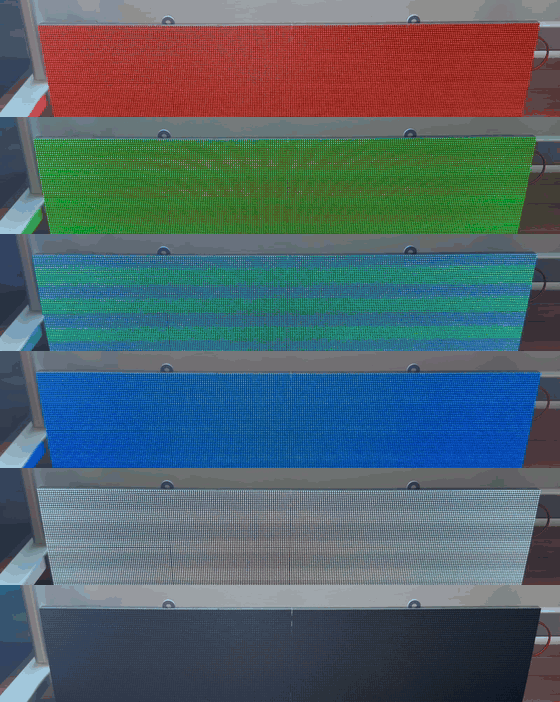
The script cycles indefinitely through this sequence:
| # | Color | RGB | What you should see |
|---|---|---|---|
| 1 | Red | (255, 0, 0) | Every LED on the chain glows pure red. |
| 2 | Green | (0, 255, 0) | Every LED on the chain glows pure green. |
| 3 | Blue | (0, 0, 255) | Every LED on the chain glows pure blue. |
| 4 | White | (255, 255, 255) | Every LED on the chain is fully lit on all three channels. |
| 5 | Black | (0, 0, 0) | All LEDs off. |
Each color holds for --hold seconds (default 2.0). Per cycle it logs [N/5] <Name> (r, g, b) to stderr.
What it lets you diagnose
Section titled “What it lets you diagnose”| Symptom on panel | Likely cause | Where to fix |
|---|---|---|
| Some panels lit, others dark | Missing per-panel power lead | Check the per-panel power leads — every panel needs its own 5V lead from the supply; the data ribbon doesn’t carry power. |
| Red shows green, or Green shows blue, etc. | led_rgb_sequence is wrong | [display] led_rgb_sequence in your config — see config-options. Common values: "RGB" (default), "BRG" (panels wired G→R, R→B, B→G — typical Muen P2). |
| Bottom half of each panel garbled, mirrored, or stuck-on | panel_type = "FM6126A" missing or driver init not running | Set [display] panel_type = "FM6126A" (or "FM6127"). Without it FM6126A driver chips power up in a bad state. |
| Only the first panel of the chain lights up | chain_length set wrong, or HUB75 IDC cables crossed | Verify [display] chain_length matches your physical chain length. Then verify each panel’s OUT goes to the next panel’s IN — easy to flip an IDC cable. |
| Visible flicker during the solid-color holds | gpio_slowdown too low for your wiring | Bump [display] gpio_slowdown — Pi 4 typically wants 2, longer chains and Pi 5 often want 3 or higher. |
| Dim or visibly-off pixels during the White frame | Hardware fault on those pixels | Physical inspection — replace the panel if widespread. |
| Pixels still glowing during the Black frame | Stuck-on pixels (hardware fault) | Physical inspection. Note position so you can rule it out in normal operation. |
CLI flags
Section titled “CLI flags”| Flag | Type | Default | Meaning |
|---|---|---|---|
--config | path | config/config.longboi.toml | Config TOML to read [display] from. Widget/section config is ignored. |
--hold | float | 2.0 | Seconds to hold each color before advancing. |
The script has no other arguments. It always cycles R → G → B → W → B and always loops forever.
sudoon the host path (host path only): the rgbmatrix C library needs/dev/memaccess. On a Pi running the host (non-Docker) path you’ll needsudo uv run python scripts/panel_color_test.py …(or justsudo make panel-test). The Docker path handles this via--privileged— Docker users don’t needsudo.- Not a substitute for
validate:panel-testcannot tell you anything about your widgets, transitions, or playlist. Usevalidatefor config-layer checks andrender-demofor widget-layer previews.